Recover permanentlly deleted files with H-Data Picture File RecoveryWhy is photo recovery available? When the photos are deleted from the computer, these photos disappear from your computer, but their contents aren't immediately destroyed. Windows simply marks the hard drive space as being available for use by changing one character in the file table so that the file entry won't be displayed in My Computer or a command line DIR command, etc. Therefore, we often recommend you not to write any data to the partition where files got deleted.If your photos have been accidentally formatted or deleted, don't be panic. Formatting a partition only erases the address table, not the data itself, so there still is a chance to do photo recovery from formatted partition with an easy photo recovery software.H-Data Photo Recovery can recover deleted photos, even if the deleted photos emptied from Recycle Bin, or recover photos lost due to software crash, formatted or damaged hard drive, virus attack, lost partition and other unknown reasons under Windows 2000/2003/XP/Vista/2008/2012/Windows 7/8/8.1. 4-step to restore Shift+ Delete files or emptied recycle bin fileStep1: Free download and install the program on your computer. Step 2. Launch H-Data Recovery Master and select "Emptied the Recycle Bin" to recover files removed from recycle bin. If you shit+deleted file, you can choose "Files Deleted Accidentally".
  Step 3. Select the disk where you lost your data and click "Scan" button, the software will quickly scan the selected disk to find all your target files. If you lost your partition, select "partition formatted/disapper" to continue the recovery process.
 Step 4. After scan, you can preview all the listed recoverable files one by one and select out those you want. Then, click "Recover" button to get them back once. Here you should save all the recovered files on another disk to avoid data overwriting.
 view H-Data Photo Recovery on Softonic.Vist more posts:H-Data Windows File Recovery - Windows 8/8.1 Permanently Deleted Files RecoverySuccessfully get back files and folders deleted from Recycle BinSolution to recover both folders and files deleted or emptied from Recycle Bin100% Data Recovery to get Erased/deleted files from Windows 8.1 hard driveWise option for recovering deleted files from external hard disk
"I lost all my saved photos on my Nokia Lumia 925 and I did not make any backups, is there anyway to recover my photos again, or I lost it forever?"Mistakes like accident delete, or format of Windows phone may causes files to be lost. If your Nokia Lumia memory card is crashed or suddenly lost all recording videos, photos, etc, it is possible to get deleted videos, photos, music back from Windows Phone 8. When Windows phone photos or video files are deleted, or when you fromat the windows phone, the raw data of those deleted files are not wiped on Windows phone. Instead, Windows phone will only mark those space as free so it can be used for new files. This makes it possible to recover deleted files on Windows phone. So stop using your Windows Phone 8 and choose a professional recovery software for undeleting. View Windows Photo Recovery on SofotonicAs above says, to increase the chance to recover deleted files, you should stop using the Windows phone immediately after you realize that photos, video, or files are deleted, this will prevent the new files to be written to the Windows phone, hence the space of deleted files will not be overwritten, and chance to recover deleted files is high. Then you can download install and run the H-Data Photo Recovery which can recover/retrieve/restore all deleted photos, videos from Windows Phone 8 like recover deleted photos from Nokia Lumia 1020, Nokia Lumia 920, Nokia Lumia 820, HTC 8X, etc for Windows users.Directly Download H-Data Photo Recovery Steps to restore important file, photos, images, movies on Windows phoneNote: Stop using the Windows phone immediately after you deleted files by mistake. Any new files written into the phone may overwrite the deleted data and decrease the chance of recovery.1. Pull out the micro SD card from your Windows phone and insert it to computer via card reader.2. Run H-Data Windows Data recovery program on windows OS (Windows 8.1/8/7/Vista/XP...)
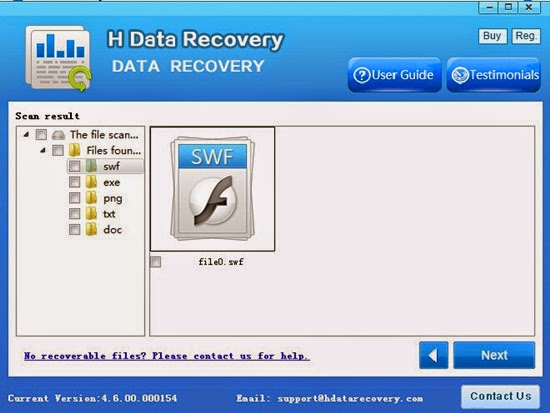
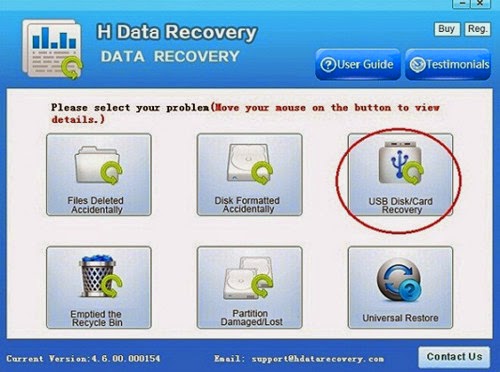 3. Scan deleted files or lost data on Windows Phne microSD cardSelect the "USB disk/Card recovery" then press "Next" to start scanning for recoverable photos, videos, and music files.4. Preview and recover files stored on SD cardAfter the program finish scanning all files, you can preview the files you wanted. Then mark the files you need. Click the “Recover” button to recover deleted data on htc one.
 View more posts2 Methods to recover deleted photos and movies from Windows Phone 72 Solutions to restore deleted media file, photos from Windows Phone 8How to restore and backup important data on Windows PhoneRestore shift deleted files and folders from Windows 8, Windows 7 and Windows XPDetect and Recover Deleted Files of 350+ Multiple Formats - Free!

